


The mocks come back. Pupils flick straight to the score, compare it with the person next to them, and the paper goes in a bag. The comments you wrote at 11pm don't get read.
There's a better way to spend that time. One sheet, built from what you saw in the scripts, handed out in the lesson after the mocks. Pupils fix their own mistakes, and you spend your one-to-one time on the few who need it.
Here's the template, a worked example, and how to run the lesson.
What is whole-class feedback?
Whole-class feedback means reading the scripts, noting the patterns, and giving feedback to the whole class at once instead of writing 30 sets of individual comments. You name what most pupils did well and the few misconceptions most of them share, show what a correct answer looks like, and give them a task to fix it. Individual follow-up goes only to the pupils who need it.
Free whole-class feedback sheet (copy or download)
Copy this onto one side of A4, or download it as a printable Word file or an Excel workbook. Download: Word template · Excel template
| Class | Paper | Date |
|---|---|---|
What most of you did well
Three things we all need to fix
| Misconception | Question(s) | Model answer / worked step | Do-now task | Tick when done |
|---|---|---|---|---|
Exam technique tip:
Your next step:
Teacher only: individual follow-up
| Pupil | Question | Why | When |
|---|---|---|---|
What each part does:
- What most of you did well names a specific question or skill, not "good effort". The EEF warns that "feedback that offers only general and vague remarks, is less likely to be effective."
- Misconception is written the way pupils would recognise it: "you added the parts", not "proportional reasoning".
- Do-now task is short enough to finish in two minutes.
- Your next step is one target the pupil writes themselves.
One rule of thumb: no more than three misconceptions. Any more and the sheet stops being read.
Filling it in from your QLA
If you've already built your QLA first, most of the sheet is already decided.
- Rows with a Gap type of Knowledge or Method and an Action of whole-class reteach become your misconceptions.
- Small group rows, and the names in Students under 50%, go into the teacher-only follow-up table.
- Technique rows become the exam technique tip.
The Excel version sits alongside the QLA layout and fills itself in: paste in your QLA rows and formulas pull the reteach, small group and technique rows into the right parts of the sheet. You then add the model answers and do-now tasks yourself, because that's the teaching bit.
Worked example: the same Higher Maths mock
Here's the class of 30 from the QLA post. The figures are illustrative.
What most of you did well
Q12 probability trees: most of you set up the branches correctly and multiplied along them.
Things we all need to fix
| Misconception | Question(s) | Model answer / worked step | Do-now task | Tick when done |
|---|---|---|---|---|
| “I shared £60 in the ratio 2:3 by giving 2 and 3 to each person” | Q7 | 2 + 3 = 5 parts. £60 ÷ 5 = £12 per part. 2 × £12 = £24, 3 × £12 = £36. Check: £24 + £36 = £60. | Share £45 in the ratio 4:5. Then share 72 sweets in the ratio 1:2:3. | |
| “I had the right method but lost the last marks” | Q18 | Solve to find x, substitute back to find y, then check both values in the other equation. | Redo Q18 in a different pen, writing the check line. |
Exam technique tip:On simultaneous equations, the check line takes 20 seconds and catches the slips that cost you accuracy marks.
Teacher only:The six pupils who dropped Q12 go in the follow-up table for Wednesday's small group.
Two fixes is fine. Three is the maximum, not the target. For more on reading what pupils actually wrote, see how to spot the hidden misconceptions in your Year 11 maths mocks.
In Science, swap the model answer for level descriptors on 6-markers: show what a level 2 and a level 3 answer include, and have pupils move their own answer up a level. Our guide to marking 6-mark Science questions shows how.
Running the feedback lesson
- Sheet before papers. Hand out the feedback sheet first. If the scripts come first, pupils will look at the score and nothing else (more on that in when students only look at the score).
- Do-now tasks. Pupils work through the misconception rows and tick each one off.
- Correct the scripts. Papers go back out. Pupils correct their own answers in a different-coloured pen, using the model answers.
- Hinge question. One question at the end shows you whether the fix landed.
- Follow-up group. While the class works, you see the pupils on your follow-up list.
This is what the EEF means by planning "for how pupils will receive and use feedback". The sheet gives them something to do with it.
Check it stuck
The lesson isn't the end. Put the same misconceptions back into next week's starters and into the next assessment. As the EEF's guidance on teacher feedback puts it, "Only then will the feedback loop be closed so that pupil learning can progress." If Q7 comes back at 38% again, the reteach didn't work, and that's worth knowing before the real exam. For more on turning mock data into marks, see how to turn mock data into 5 extra marks per class.
With Excelas Learn, get the sheet filled for you
How it works
- Step 1
Marking finishes
Teachers get an email when results are ready.
- Step 2
Open the report
Question analysis and insights are generated automatically.
- Step 3
Export or adjust
Export to CSV, or adjust marks and re-run the report.
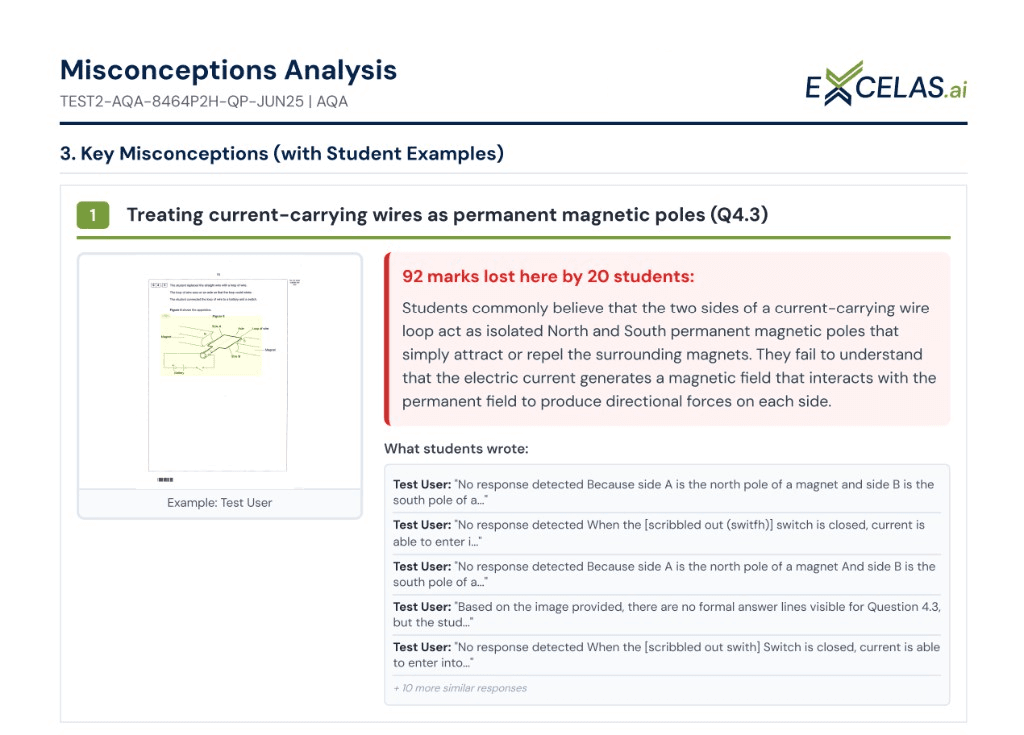
The slow part is reading 30 scripts to find the patterns. Excelas marks the mock scripts and builds the class report for you. AI supports the teacher's marking, it never replaces it, and a teacher reviews and owns every final mark.
The class report's Key Misconceptions show how many pupils lost marks on each question and examples of what they actually wrote, which gives you your misconception rows. Quick Actions, split into "This week" and "Next assessment", give you your do-now and follow-up rows. See how feedback and reporting works in Excelas Learn.
Want to see it on your own papers? Fill in this form to get your scripts marked: upload 1–5 sample scripts with their mark schemes, then book a 30-minute slot to walk through the results.