


The mocks are marked. The marks go into a spreadsheet, the spreadsheet turns red and green, and then it gets filed. Most of us have been there.
The data isn't the problem. The grid just stops before anyone makes a decision. A question level analysis is only worth the time if it ends with a clear answer to "what am I teaching differently next week?"
Here's a simple template that gets you there. It works for any subject. We've used a Higher Maths paper as the worked example, but the columns are the same whether it's Science, English, History or Geography.
What is question level analysis?
Question level analysis (QLA) means recording each student's marks question by question, rather than just their total. That lets you see patterns by question and by topic: which questions the whole class dropped, and which ones only a few students struggled with. Exam boards provide this for the real exams. For mocks, you usually have to build it yourself. The template below works for any GCSE subject and for AQA, Edexcel and OCR papers alike.
Free GCSE QLA template (copy or download)
Copy this into a spreadsheet and add one row per question, or download the free QLA template with the worked example below on a second tab:
| Question | Topic | Marks | Class % | Students under 50% | Gap type | Action | When |
|---|---|---|---|---|---|---|---|
The first five columns are the usual QLA. The last three are where it turns into a plan.
Gap type is your judgement about why the marks went: a gap in knowledge, a method slip, exam technique, or a question students didn't attempt.
Action is one of whole-class reteach, small group, starter retrieval, or leave it for now.
Two rules of thumb (rules of thumb, not laws):
- If the class scored under about 50% on a question, reteach it to the whole class.
- If most of the class got it but a cluster didn't, take that cluster as a small group.
One more: if lots of students left a question blank near the end of the paper, check whether they ran out of time before you assume they don't know the topic.
A worked example
Here's how it might look for a class of 30 on a Higher Maths paper. The figures are illustrative.
| Question | Topic | Marks | Class % | Students under 50% | Gap type | Action | When |
|---|---|---|---|---|---|---|---|
| Q7 | Ratio | 3 | 38% | 19 | Knowledge | Whole-class reteach | Monday |
| Q12 | Probability trees | 4 | 81% | 6 | Method | Small group | Wednesday |
| Q18 | Simultaneous equations | 4 | 55% | 11 | Technique (lost accuracy marks) | Starter retrieval | All week |
| Q23 | Proof | 5 | 22% | 25 | Didn't attempt | Check timing first | Next mock |
What Monday looks like:
- A 10-minute ratio reteach, built on the actual misconception, not the topic in general. Look at the scripts first. If most students added the parts instead of sharing in proportion, teach that directly. How to spot the hidden misconceptions in your Year 11 maths mocks goes deeper on reading the wrong answers.
- A hinge question at the end of the reteach, so you know whether it landed before you move on.
- The six students from Q12 come together as a small group on Wednesday. Everyone else has the method secure, so there's no need to reteach the whole class.
- Q23 is held back. With 25 students under 50% and most of them leaving it blank, it's a timing problem until you've proved it's a proof problem. Look again after the next mock.
Q18 sits in starters all week. The method was there; the accuracy wasn't. For more on squeezing marks out of what the mock tells you, see how to turn mock data into 5 extra marks per class.
Read where the marks went, not just the totals
In any subject, 2 out of 4 tells a very different story from 0 out of 4. In Maths, a student who picked up the method marks needs practice in finishing, not a reteach. Where you can, note where the marks were lost. Why follow-through marks are a nightmare to get right and how to avoid the CAO and WWW traps are both worth a look here.
For essay and extended-response subjects like English, History or Science, use the Gap type column to record which level each student reached, not just the mark. See our guide to marking 6-mark Science questions.
Close the loop with students
The EEF's guidance on teacher feedback is clear that feedback only helps when it comes at the right time, moves learning forward, and is planned so pupils actually do something with it.
So turn your top three rows into a short whole-class feedback sheet and a re-attempt task. Then put those questions back into the next assessment to check it stuck. If students tend to look at the score and nothing else, these feedback strategies students actually act on will help. If you're taking all this to a department meeting, here's how to run a results meeting that actually improves teaching.
How to get your QLA done for you
Filling this in for 30 students across every question on the paper is the bit that takes the evening, and it's the reason so many QLAs never happen.
With AI mock exam marking, Excelas marks the scripts and builds the analysis for you. AI supports the teacher's marking, it never replaces it, and a teacher reviews and owns every final mark. Once every script in the set is marked, you get two reports.
The class Teacher Intervention Report covers the template's columns for you:
- Question Performance, sorted worst to best, with average marks, mark distribution, % left blank, topic, Sparx code and the mark scheme. That's your Question, Topic, Marks and Class % columns, plus the blanks that flag a timing issue.
- Students Below Pass, with the marks each student needs to reach a grade 4. That's your Students under 50% column, made specific.
- Key Misconceptions, showing how many students lost how many marks and examples of what they actually wrote, such as using a point's y-coordinate as a circle's radius. That's your Gap type column, with the evidence attached.
- Quick Actions, split into "This week" (starters, 1:1 check-ins) and "Next assessment" (diagnostic warm-ups, pre-teaching misconceptions). That's your Action and When columns.
The per-student report gives a question-by-question table with topic, subtopic, spec reference, Sparx code and marks, plus What Went Well / Even Better If comments and the reason behind each mark awarded.
The quickest way to see it is to look at a real one. Pop your email in below and we'll send you a fully marked GCSE mock, with the class report and a student report side by side.
See a fully marked GCSE mock
Every mark explained, plus the class's question-level gaps.
Free. Straight to your inbox.
Or bring a script and we'll mark it live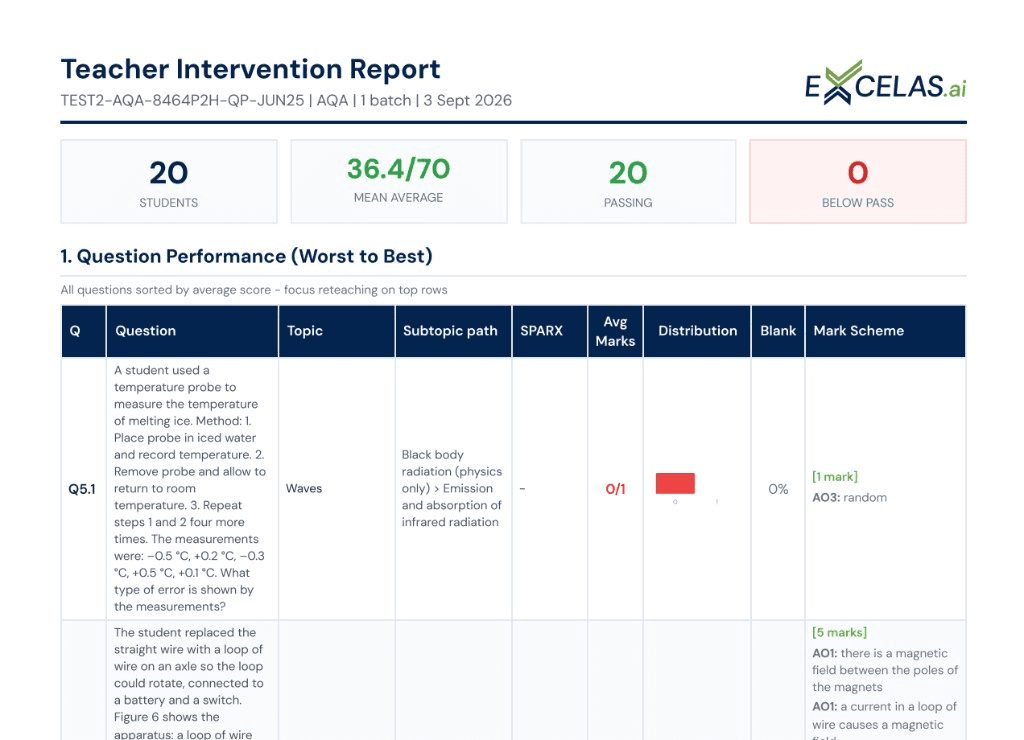
When it arrives, put it next to your own spreadsheet. Find the question your class dropped most, then check the misconceptions section for what students actually wrote. That's your Monday reteach, already planned. If you want to go further, there's more on how the question-level analysis and reports work, and on turning those misconceptions into worksheets built for your class.
Try it on your own paper
Use the template on your next mock and see what Monday looks like. If you'd rather see the analysis done for you, grab the sample above.